New application request (PM → Infrastructure handover)
Everything below is grounded in our real setup (the C# API in the DMZ, Azure-hosted front-ends, Oracle on-prem). Use it to answer questions in meetings.
00The process, start to finish — 4 tickets per app
The whole lifecycle on one page. 3 Resource Group tickets + 1 DNS ticket.
#
Step
When
Details
0
Name approval (Legal + Marketing)
First — gates everything
The approved name becomes the FQDN. HOW IT WORKS (per Steve Harley, 2 Jul): the DASH DNS ticket is itself step 1 of approval — submit it with the names + purpose; it gets business approval, then a technical check (name/IP availability), then goes to Legal. Everything must be tracked in DASH — email alone is not adequate. So the DNS ticket is the approval vehicle (raise it as soon as the DEV RG gives you the CNAME target); the email just tags the owners.
1
RG ticket — DEV Cloud Security Services → Azure Resource Group Creation
Start of project
Attach architecture doc + Business Purpose (the app-description text, from the PM handover). KBR creates its own TASKs: RG + SWA + Storage + Logs, two app regs (swa + api), AD group, role assignments. Secret is emailed separately — record its expiry in the tracker.
2
DNS ticket — once for the app Enterprise Security → DNS
After the DEV RG exists — the front-end CNAME needs its target (the dev SWA default domain), which only exists once the RG is built. The ticket also starts name approval.
FQDN field = base (PROD) name. IP = 161.51.7.202 (submit value; Network assigns real per-env VIPs). Justification lists all environments, front + back. Attach the ASP (doubles as the firewall doc). Front-end names: include the CNAME TARGETS (the SWA default domains) in the ticket — Picotte can't create a CNAME without its target (learned 6 Jul, PCDM). Then the follow-up email tagging Batson (F5) → Rama (firewall) → Picotte (DNS). KBR creates the TASKs — we can't.
3
RG ticket — STG
After DEV is closed/verified
Same as step 1, staging subscription. DNS already covers stg- names.
4
RG ticket — PROD
After STG is closed/verified
Same again, production subscription.
One DNS ticket vs two: one ticket covers front + back if you own both layers. If someone else raises one layer (PCDM: Saranda raised the back-end), it's two tickets — so 4 per app normally, 5 if split.
Per-layer reminders
Back-end (C# API): full chain, in order — name → F5 VIP → firewall → DNS (A-record to VIP). Inbound 443 only.
Front-end (SPA on Azure): DNS CNAME to the Static Web App only — no F5, no firewall. Power Apps front-end: no DNS at all; instead a Power Platform environment + connectors through DLP (Armbrester).
After KBR says "done"
Validate the path: Resolve-DnsName → Test-NetConnection -Port 443 → curl -v https://<fqdn>/. Resolves + 443 open + BIGip cookie = network done. 404/IIS splash = app not deployed (dev-side, not network). Full API test needs a token (dev side generates it).
01The big picture — three tiers
Every one of our apps is the same shape: a front-end users see, an API that holds the logic, and a database that holds the data. This is "client–server" / "3-tier" architecture.
Tier
What it is
Where it lives
Front-end (client)
The UI the user interacts with — a browser SPA (HTML/JS or React) or a Power Apps app
Azure / Microsoft cloud
Back-end (API)
A C# .NET Web API — all business logic, permission checks, and data access
KBR DMZ (on-prem)
Database
Oracle 19c — the single source of truth for app data
KBR internal network
Why split it this way (hybrid)? The front-end is just static files — safe and cheap to host on Azure's global network. The back-end touches sensitive KBR data, so it stays on-prem, close to the Oracle database and inside KBR's own security perimeter. The two halves talk over encrypted HTTPS.
The golden rule: the front-end never touches the database directly. It only ever calls the API, and the API is the only thing allowed to talk to the database. Every request also carries proof of who the user is (a token — see Authentication).
02How a request flows, end to end
Follow one button-click from the user's browser to the database and back.
Azure / Microsoft KBR DMZ KBR internal
Step by step:
(a) Sign in. The front-end sends the user to Entra ID. After login (+ MFA), Entra issues a signed JWT access token. The front-end attaches it to every API call.
(b) Call the API. The front-end makes an HTTPS (443) request to e.g. dev-<app>-api.kbr.com. DNS resolves that name to the F5 VIP public IP.
(3–4) Through the edge. Traffic hits the F5 (the public front door), passes the firewall (which only permits 443), and reaches the C# API on an IIS server in the DMZ.
(5) The API does its job. It validates the token (checks it really came from KBR's Entra tenant), checks a CORS rule (only our own front-end is allowed to call it), and checks the user's role/permissions.
(out) Microsoft calls. To validate tokens, store files, or send mail, the API reaches out over 443 to Microsoft (login.microsoftonline.com, *.blob.core.windows.net, graph.microsoft.com).
(6) Database. The API queries Oracle on the internal network, then returns the answer back up the same path over HTTPS.
03Ports & IPs — the answers you'll be asked
Port
Open?
Why
443 (HTTPS)
OPEN
The only inbound port. All traffic is encrypted. Clients (SPA, Power Apps connector) always call HTTPS.
80 (HTTP)
CLOSED
Unencrypted, and not needed. Our ASP states inbound 443 only. An API is never typed into a browser bar, so there's nothing to redirect from 80. Leaving 80 closed removes an attack surface.
The port-80 question, settled: keep it closed. The only classic reason to open 80 is to auto-redirect a human typing http://… to https://… — that applies to a website, not an API, and for our Azure front-ends Azure handles HTTPS and the redirect itself. So neither tier needs port 80 from us.
Which IPs are "allowed"?
Direction
What's allowed
Inbound destination
On the DNS ticket you open, the request IP is always 161.51.7.202 — that's the standard value we submit with. The Network team then assigns the actual per-environment F5 VIP from their range (e.g. Reporting Hub got PROD .44 / DEV .143 / STAGE .51). Which final IP they use is their call, not ours.
Inbound source
Not restricted by IP. Requests come from KBR users' browsers, which can be anywhere — there's no fixed source IP/subnet to allow-list. Access is instead controlled at the application layer: a valid Entra JWT on every request + a strict CORS policy. (This is exactly what §2.6 / §5.2 of the ASP say.)
Outbound (from API)
HTTPS 443 to a small set of Microsoft endpoints only: login.microsoftonline.com (auth), graph.microsoft.com (mail), *.blob.core.windows.net (files).
Internal
From the API server to the Oracle DB servers only (Oracle's port, default 1521), inside the KBR network.
04The firewall & the DMZ — why they exist
The firewall is what makes it safe to expose an internal app to the internet.
A DMZ ("demilitarized zone") is a buffer network that sits between the public internet and KBR's trusted internal network. Anything internet-facing — like our C# API — lives there, not on the internal network. If something in the DMZ is ever compromised, the attacker is still walled off from the internal systems (the Oracle database, KBR's corporate network).
The firewall enforces that wall with least-privilege rules:
Internet → DMZ: allow only TCP 443 to the F5 VIP / web servers. Everything else is denied.
DMZ → internal: allow only the API servers to reach the Oracle DB on its port. The DMZ cannot freely roam the internal network.
DMZ → internet (outbound): allow only 443 to the specific Microsoft endpoints the API needs. No general internet access.
Why we need it for our apps: the API has to be reachable from the internet (the Azure-hosted front-end calls it from users' browsers). The moment something is internet-reachable, the firewall is what guarantees only the intended traffic (443, to the right place) gets through and that a breach can't spread inward. That's why "firewall implementation" is a required step in every back-end DNS request.
04bExposing the back-end: F5 VIP vs Azure Front Door
The key to the "can we have one IP?" conversation — and where to push back vs agree.
Source IP vs destination IP — don't mix them up
Term
What it is
Can it be "one IP"?
Destination IP
The back-end's public entry point that traffic is sent to (the F5 VIP)
Yes — one per env Normal. Everyone resolves the hostname to this one VIP.
Source IP
Where the request comes from (the client)
No — for a browser app Users are on office/home/mobile networks; there is no single client source IP to allow-list.
So when a network engineer asks for "one IP on the front side as a source," they almost certainly mean Azure Front Door. Don't answer "impossible" — that's only true for direct browser→API. The single front-side source they want is achievable, via AFD (below).
Two ways to expose the on-prem API to the internet
Direct (F5 VIP): open the firewall so the internet can reach the F5 VIP. Source = every client IP, so you can't allow-list source — access is controlled by the Entra token + CORS.
Azure Front Door (AFD): clients hit AFD (Microsoft's global reverse proxy + WAF); AFD forwards to the on-prem API. Now every request reaches the back-end from AFD, a known, bounded set of Microsoft IPs (the AzureFrontDoor.Backend service tag). The back-end firewall trusts only AFD instead of the whole internet.
This is the trick: AFD collapses "thousands of client IPs" into one controlled front-side source. That's the single source IP the network team wants. Extra safety: the back-end also checks the X-Azure-FDID header so it only accepts traffic from our AFD, not someone else's.
The one front-end "single IP" that truly can't exist
If asked for a single fixed IP for an Azure Static Web App front-end: there isn't one. A SWA is reached by CNAME to Microsoft's anycast network, not a fixed A-record IP. Hold firm on that.
Reading their test results
Result
Means
Timeout (from internet)
Firewall not open to the internet yet (or AFD not wired). Network path blocked.
IIS splash page / 404 (from inside KBR)
Network path works — you reached the server — but the app isn't deployed at that address yet. A dev-side deploy task, not a network issue.
The app responds
Both network and deployment are good.
Always call the API by hostname, never raw IP. Raw-IP requests hit the default IIS page / 404 (the app is bound to its host name) and break HTTPS (certs are issued for names, not IPs). DNS maps <app>-api.kbr.com to the VIP.
The question to ask, not the pushback to make
"Are we exposing the back-end through Azure Front Door, or directly to the F5 VIP? If AFD, the single front-side source is AFD itself — we lock the firewall to AFD's range + the X-Azure-FDID header. If direct, there's no single client source IP, so access is the Entra token + CORS."
05The F5 & the VIP — the public front door
An F5 is a load balancer / reverse proxy that sits at the edge of the DMZ. A VIP ("virtual IP") is a single public IP it presents to the world. The DNS name for the API points at this VIP, and the F5 forwards valid traffic to the actual web server(s) behind it.
What the F5 gives us:
Single public entry point — one VIP per environment instead of exposing servers directly.
SSL/TLS handling — terminates HTTPS at the edge.
Load balancing — can spread traffic across the DEV/STG/PROD member servers (HOU99WEBSD00031 / SS00041 / SP00075).
X-Forwarded-For — preserves the real client IP in logs even though the F5 is in the middle (a checkbox in the ASP, §2.9).
VIP is an output, not an input. When you raise the request, the Network team creates the VIP and gives you back its IP — that's why "VIP on F5" is step 1 and DNS (which points the name at that IP) is the last step.
06How Azure hosts our front-ends
The cloud half of the hybrid. These are the Azure pieces you'll hear named.
Azure Static Web Apps (SWA)
Hosts the HTML/JS or React front-end. Serverless, with a global CDN, automatic HTTPS, and built-in CI/CD from the code repo. Gets a default <name>.azurestaticapps.net address; our custom kbr.com name points to it by CNAME. (Power Apps apps use the Power Platform instead — same idea, Microsoft-hosted.)
Entra ID (Azure AD)
KBR's identity provider. Signs users in (with MFA) and issues the tokens the API trusts.
App Registration
An identity entry in Entra for an app. We get two per app: an SWA app reg (front-end identity, no secret) and an API app reg (back-end identity, has a client secret that expires — track it!).
Entra security group
Controls who can use the app — add the right people, the app checks membership.
Resource Group
A folder that holds an app's Azure resources (the SWA, storage, logging) so they're managed together.
Azure Blob Storage
Where uploaded files go.
Application Insights
Telemetry — performance, errors, usage.
Why front on Azure, back on-prem? The front-end is static, public, and benefits from Azure's CDN + free HTTPS — no reason to keep it on KBR servers. The back-end holds the logic and the keys to the Oracle data, so it stays inside KBR's perimeter. They meet over HTTPS.
07Authentication — the token handshake
How the app knows who you are, on every request (OAuth 2.0 + JWT).
The front-end uses MSAL (for SPAs) or the Power Apps custom connector to send you to Entra ID to sign in.
Entra checks your credentials (+ MFA) and issues a JWT — a signed token that says who you are and that it came from KBR's tenant.
The front-end attaches that token to every API call as Authorization: Bearer <token>.
The API validates the token (right issuer, right audience, untampered signature) before doing anything. To verify the signature it fetches Entra's public keys — that's one reason the API needs outbound 443 to login.microsoftonline.com.
Then it checks authorization: your role/permissions (stored in the DB) decide what you're actually allowed to do.
Authentication ≠ authorization. Authentication = "who are you" (the token). Authorization = "what are you allowed to do" (your role). Both happen on every request.
08Front-end vs back-end DNS — they differ
Back-end (API)
Front-end (SPA)
Name
dev-<app>-api.kbr.com
dev-<app>.kbr.com
Points to
F5 VIP → DMZ servers
Azure Static Web App
Record type
A record → VIP IP (161.51.7.202)
CNAME → <name>.azurestaticapps.net
F5 / firewall?
Yes — full VIP→firewall→DNS chain
No — Azure serves it directly
Power Apps front-ends don't get a custom DNS name at all (they're reached through the Power Apps portal) — so a Power Apps + C# project only needs a DNS ticket for its API.
09Our deployment process
What we do, and what KBR does, for a new app.
We raise one ticket per project (front + back) via DASH → Enterprise Security → DNS, attach the App Security Profile (ASP), and send an email follow-up tagging the owners. KBR creates the underlying tasks (we can't on our side). The back-end runs through this order:
#
Step
Owner
0
Name approval (Legal + Marketing)
Steve Harley / Lisle Weber
1
VIP on F5 (returns the VIP)
Alexander Batson — Network
2
Firewall implementation
Rama Rao Adharapurapu — Ent. Security
3
DNS record (last — points the name at the VIP)
Michael Picotte — DNS
Separately, the Azure side (Resource Group + Static Web App + Storage + Logs, two App Registrations, and an AD group) is set up via the "Azure Resource Group Creation" request, which KBR fans out into its own tasks.
10Glossary
API
The back-end service that holds the logic and talks to the database. Ours is C# .NET.
SPA
Single Page Application — a browser front-end (HTML/JS or React) that updates without full page reloads.
DMZ
A buffer network between the internet and KBR's internal network, where internet-facing apps live.
F5 / VIP
The edge load balancer (F5) and the single public IP it presents (VIP).
Firewall
Enforces which traffic (ports, destinations) may cross between zones.
CORS
A rule on the API that allows calls only from our own front-end's web address.
JWT
A signed token proving who the signed-in user is; sent with every API call.
OAuth 2.0
The standard flow used to obtain that token from Entra.
MSAL
Microsoft's library the SPA uses to do the OAuth flow and hold tokens.
Azure service hosting the static front-end with CDN + auto HTTPS.
App Registration
An app's identity in Entra (SWA = front identity, API = back identity with a secret).
CNAME vs A record
CNAME points a name at another name (used for the SWA); A record points a name at an IP (used for the F5 VIP).
IIS
The Windows web server the C# API runs on in the DMZ.
ASP
App Security Profile — the form attached to every request describing the app's security posture.
How to create each ticket, with real screenshots from our own submissions. Grey notes mark screenshots still to capture on the next run.
AResource Group ticket (same form for DEV, STG, PROD)
DEV at project start (after the PM handover: approved name + architecture doc + business purpose). STG after the dev app is verified; PROD after STG. One ticket per environment.
A1 · Open the catalog item
DASH → Service Catalog → Cloud Security Services → Azure Resource Group Creation. 📷 catalog screenshot — capture on next ticket
A2 · Fill the form — standard values
Field
Value
Azure Tenant
KBRCORP
Resource Group Name
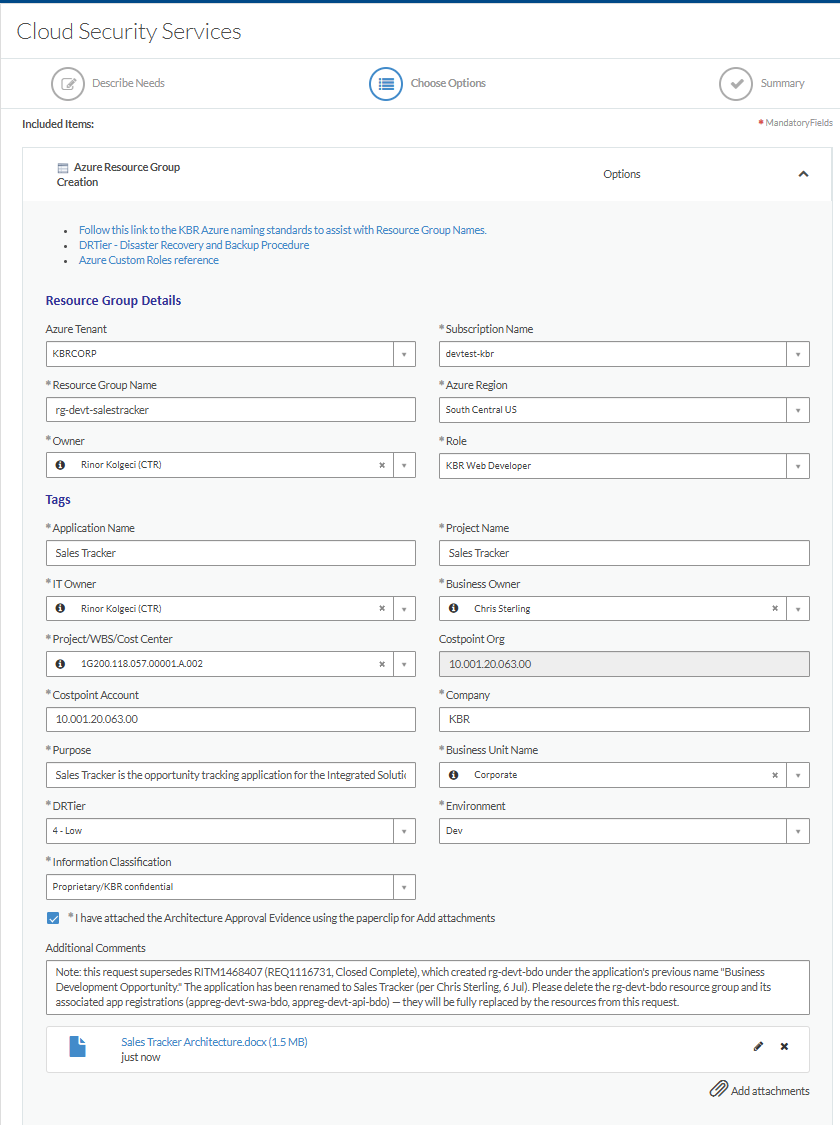
rg-<env>-<code> — env: devt / stg / prd; code lowercase, no hyphens (e.g. rg-devt-salestracker). State it explicitly.
Subscription
devtest-kbr / stage-kbr / production-kbr (match the environment)
Azure Region
Central US is NOT in the dropdown ⚠ — select South Central US and request Central US in Additional Comments ("Other location" demands a justification form)
Role
KBR Web Developer
Application / Project Name
the full approved name
IT Owner / Owner
Rinor Kolgeci (CTR)
Business Owner
Chris Sterling
Project/WBS
1G200.118.057.00001A.002
Costpoint Acct / Org
10.001.20.063.00 / 10.001.20.063.00
Company / BU
KBR / Corporate
DR Tier
4 – Low (DEV & STG) · High (PROD)
Information Classification
Proprietary / KBR confidential
Environment
Dev / Stage / Prod
Purpose
the Business Purpose text from the PM handover
Attachment
the approved architecture document (tick the evidence checkbox)
The filled form — Sales Tracker DEV, 8 Jul 2026 (region shows South Central US because Central US is missing from the dropdown — corrected via comments at checkout)
A3 · Checkout — justification, approver, comments
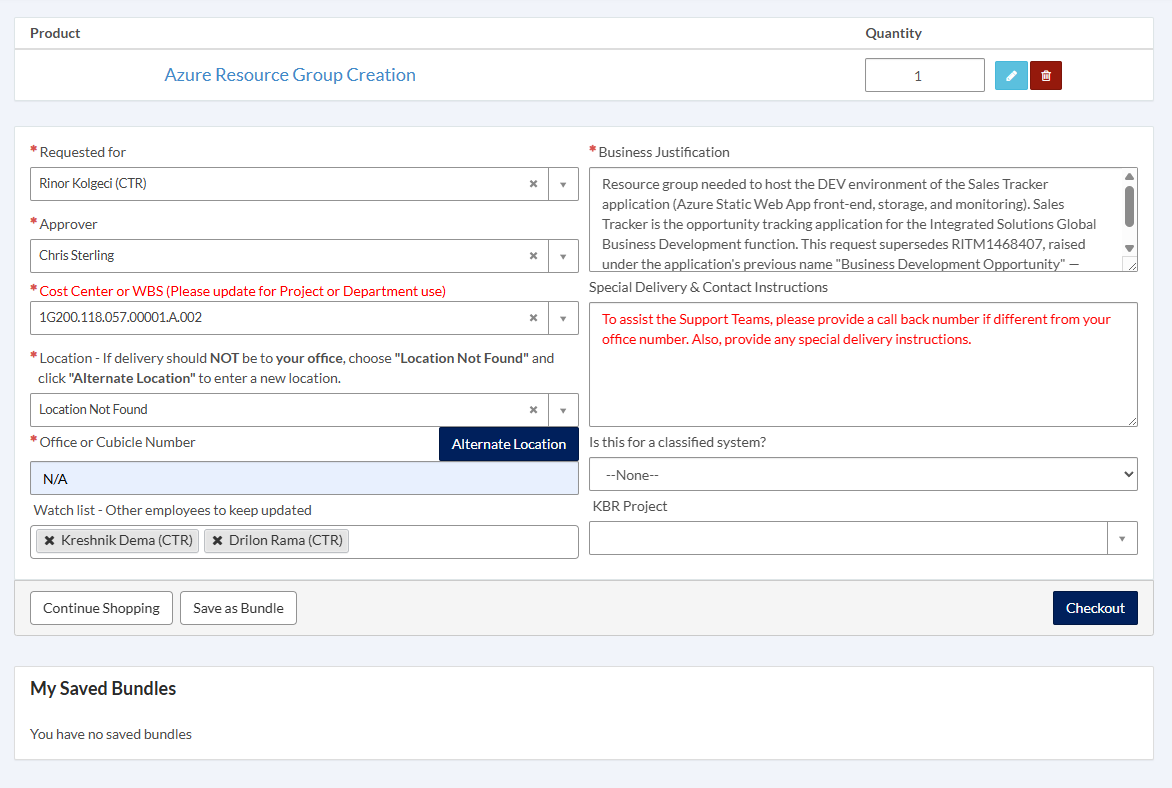
Requested for: yourself · Approver: Chris Sterling · Location: "Location Not Found" + N/A. Business Justification: why the RG is needed — "Resource group needed to host the DEV environment of the <App> application (Azure Static Web App front-end, storage, and monitoring). <One purpose sentence>." Add any supersede/rename reference. Watch list: Kreshnik + the project coordinator. Additional Comments: the Central US region request + any special instructions (e.g. delete superseded resources).
Checkout — Sales Tracker DEV: justification with supersede note, Chris Sterling as approver, watch list set
Checkout → note the REQ and RITM → record in the tracker immediately. 📷 confirmation screenshot — capture on next ticket
A4 · What KBR creates (verify when closed)
RG + Static Web App + Storage + Log Analytics + App Insights; two app registrations (swa + api); AD group; role assignments. The API secret arrives by separate email — record its EXPIRY in the Secrets tab (never the value). Verify resources + actual region in the Azure portal. 📷 portal verification — capture on next completion
BDNS ticket (once per application, all environments)
AFTER the DEV RG exists — the front-end CNAME needs the dev SWA default domain as its target. This ticket is also step 1 of KBR Legal name approval. Track everything in DASH; email is a courtesy.
B1 · Get the CNAME target first
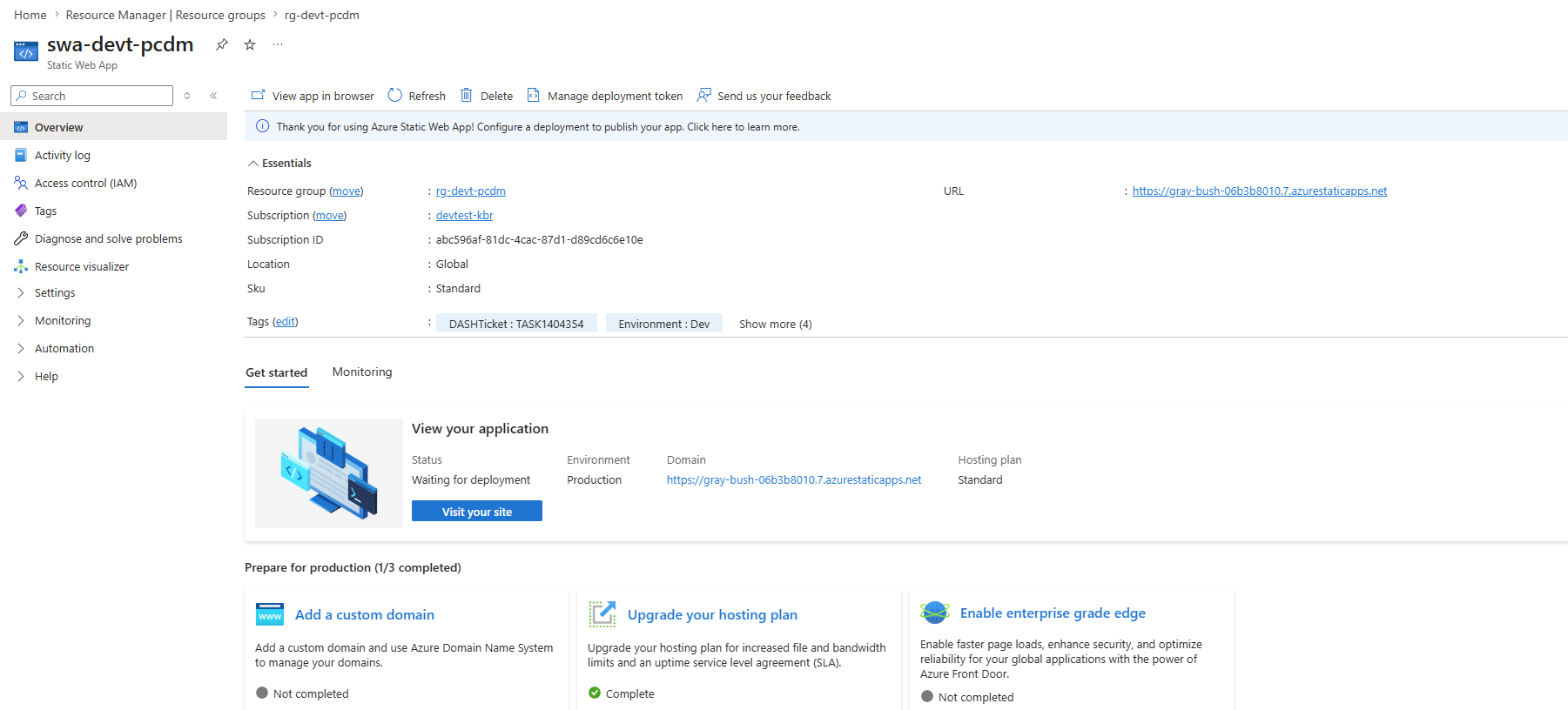
Azure portal → dev RG → the Static Web App → Overview → URL / Default domain — hostname only, no https://.
swa-devt-pcdm Overview — the URL is the CNAME target. "Waiting for deployment" = SWA exists but no front-end published yet
B2 · Fill the ticket
Field
Value
Catalog path
Enterprise Security → DNS (Action: DNS Requests)
FQDN
the base (PROD) front-end name, e.g. sales-tracker.kbr.com
IP Address
161.51.7.202 — submit value only; Network assigns real per-env VIPs
Detailed Business Justification
Short purpose (Legal judges the name from this) + ALL names: front-end CNAMEs (dev → the SWA default domain; stg/prod targets to follow) and back-end -api A records (dev/stg/prod)
Attachment
the App Security Profile (doubles as the firewall document)
📷 DNS form screenshot — capture when raising the Sales Tracker DNS ticket
B3 · Submit, record, email
Note the RITM → tracker. Follow-up email with the ASP: To Batson (F5) / Rama (firewall) / Picotte (DNS); Cc Amant, Milot, Kreshnik, PM, Rigo, Chris Sterling. If the name isn't approved yet, also tag Steve Harley / Lisle Weber. KBR creates the TASKs — we cannot.
B4 · Validate when KBR says done
Resolve-DnsName <fqdn> → per-env VIP (back) or SWA hostname (front) · Test-NetConnection <fqdn> -Port 443 → True · curl.exe -v https://<fqdn>/ → BIGip cookie = through the F5. Bare 404 / IIS splash = network done, app not deployed (dev-side task). Front-end: after the CNAME exists, add the custom domain on the SWA.